
kUSRP 사용설명서User Manual · Web
kUSRP Web 은 설치 없이 웹 브라우저에서 BrandMeister DMR(STFU), D-STAR, DMR+, TGIF, FreeDMR,
NXDN, P25, YSF, M17, AllStarLink(ASL), EchoLink 로 교신하는 kUSRP 의 브라우저판입니다.
PC · 휴대폰 · 태블릿 어디서나 kusrp.ddnsfree.com/web 에 로그인하면 바로 쓸 수 있습니다.
kUSRP Web is the browser edition of kUSRP: talk on BrandMeister DMR (STFU), D-STAR, DMR+, TGIF, FreeDMR,
NXDN, P25, YSF, M17, AllStarLink (ASL) and EchoLink from a web browser, with nothing to install.
Sign in at kusrp.ddnsfree.com/web on a PC, phone or tablet and start right away.
BrowserSTFU (BM DMR)D-STARDMR+TGIFFreeDMRNXDNP25YSFM17ASLEchoLink
→ kUSRP Web 열기 (kusrp.ddnsfree.com/web)→ Open kUSRP Web (kusrp.ddnsfree.com/web)
1.소개Introduction
- 설치 없음 — Chrome · Edge · Safari 등 최신 브라우저와 마이크만 있으면 됩니다.Nothing to install — any modern browser (Chrome, Edge, Safari …) with a microphone.
- 앱과 같은 계정 · 설정 — 로그인 · 설정 · TG 목록 · 로그북은 kUSRP 앱(PC · Phone · PoC)과 같은 서버를 씁니다.Same account and settings as the apps — sign-in, settings, TG lists and logbook are shared with the kUSRP apps (PC · Phone · PoC).
- 11 개 모드 — STFU · D-STAR · DMR+ · TGIF · FreeDMR · NXDN · P25 · YSF · M17 · ASL(IAX · WT) · EchoLink.11 modes — STFU · D-STAR · DMR+ · TGIF · FreeDMR · NXDN · P25 · YSF · M17 · ASL (IAX · WT) · EchoLink.
- LastHeard · QRZ — TG 마다 ON AIR · 최근 3 시간 기록, 상대 국의 사진 · 국기 · 이름 · 주소를 보여 줍니다.LastHeard · QRZ — ON AIR and the last 3 hours per TG, plus the other station's photo, flag, name and address.
2.시작 · 로그인Getting started · Sign in
- 브라우저에서 https://kusrp.ddnsfree.com/web/ 을 엽니다.Open https://kusrp.ddnsfree.com/web/ in your browser.
- 🏠 시작 탭에서 Callsign 을 넣고, 나오는 DMR ID 중 내 것을 고른 뒤 BM Password(BrandMeister Hotspot Security 비밀번호)를 넣고 로그인합니다.On 🏠 Home, enter your Callsign, pick your DMR ID from the list, enter your BM Password (BrandMeister Hotspot Security) and sign in.
- 웹 로그인은 30 일 유지됩니다. 오른쪽 위 한글 | EN 으로 언어를 바꿉니다 (설명서도 같이 바뀜).Web sign-in lasts 30 days. Switch language with 한글 | EN at the top right (the manual follows).
- 🎙 Radio 탭을 열고 처음 접속할 때 브라우저가 묻는 마이크 사용을 허용합니다.Open 🎙 Radio; when you first connect, allow microphone access when the browser asks.
브라우저는 사용자가 화면을 한 번 눌러야 소리를 냅니다. 소리가 안 나면 화면 아무 곳이나 한 번 누르세요.
Browsers only play audio after you interact with the page. If you hear nothing, tap anywhere on the page once.
3.Radio 화면Radio screen
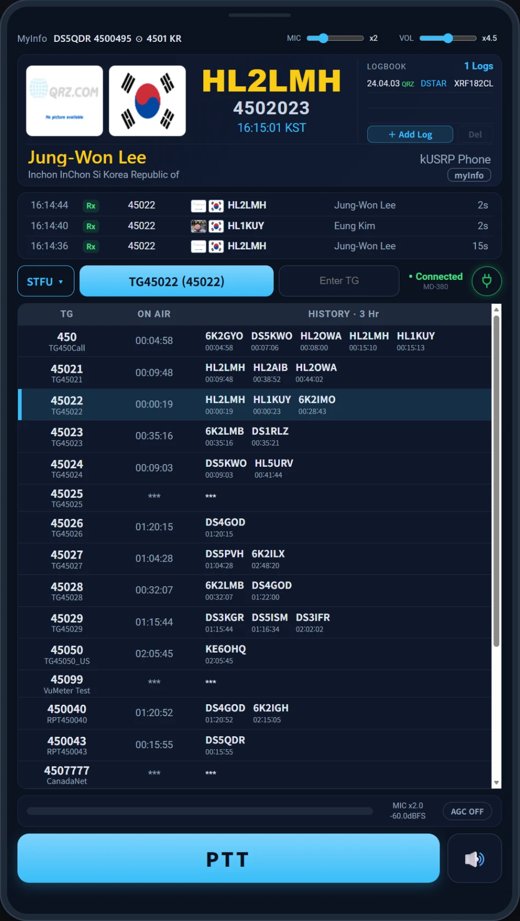
▲ Radio 화면 (STFU · TG 45022 수신 중)Radio screen (STFU · receiving on TG 45022)
- MyInfo 줄 — 내 콜사인 · DMR ID · 지금 모드. 오른쪽 MIC(송신 음량) · VOL(수신 음량) 슬라이더.MyInfo bar — your callsign, DMR ID and current mode; MIC (TX level) and VOL (RX volume) sliders on the right.
- 정보 카드 — 지금 말하는 국의 QRZ 사진 · 국기 · 콜사인 · 이름 · 주소 · 현지 시각. 사진을 누르면 qrz.com 이 열립니다. 주소 줄 오른쪽 [myInfo] 를 켜면 내가 송신할 때 카드가 내 정보로 바뀌고, 끄면 마지막 수신국이 그대로 남습니다.Info card — QRZ photo, flag, callsign, name, address and local time of the talking station; the photo opens qrz.com. With [myInfo] (right end of the address line) on, the card switches to you while you transmit; off keeps the last station.
- Logbook (카드 오른쪽) — 이 국과의 교신 수 · 최근 기록. + Add Log 로 바로 기록, 줄을 고른 뒤 Del 로 삭제.Logbook (right of the card) — QSO count and recent logs with this station. + Add Log logs it; select a row and press Del to delete.
- TX / RX 기록 — 시각 · Rx/Tx · TG · 콜사인(작은 QRZ 사진 · 국기) · 이름 · 길이.TX / RX log — time, Rx/Tx, TG, callsign (small QRZ photo · flag), name, duration.
- 모드 버튼 ▾ — 모드 고르기. ASL 일 때는 옆에 WT 버튼 (켜면 노란색 = allstarlink.org 공개 접속, 끄면 내 노드).Mode button ▾ — choose the mode. For ASL a WT button appears (yellow = allstarlink.org public link, off = your own node).
- TG 버튼 · 입력 칸 — 지금 TG/노드. 칸에 번호를 넣고 Enter 로 바로 바꿉니다.TG button · input — current TG/node. Type a value and press Enter to switch.
- ⏻ 전원 버튼 — 접속 / 끊기. 상태(Connected · 보코더)가 옆에 보입니다. 다음에 열면 지난번 TG 로 바로 접속합니다.⏻ Power button — connect / disconnect; the state (Connected · vocoder) is shown next to it. Next time it reconnects to the last TG.
- TG 표 — 설정의 TG LIST. ON AIR(지금 말하는 국) · HISTORY(최근 3 시간). 줄을 누르면 그 TG 로 바뀝니다.TG table — your TG LIST with ON AIR (talking now) and HISTORY (last 3 hours). Click a row to switch.
- 노드 정보 상자 (ASL · EchoLink) — 연결된 노드와 그 노드에 링크된 노드 · 접속 국 목록.Node info box (ASL · EchoLink) — the connected node and the nodes / stations linked to it.
- 레벨 미터 · AGC — 마이크 / 수신 레벨. AGC 는 브라우저 자동 음량 조절 켜기 / 끄기.Level meter · AGC — mic / RX level. AGC toggles the browser's automatic gain.
- PTT · 🔊 — PTT 를 누르면 송신, 다시 누르면 끝 (PC 는 스페이스 바도 같음). 🔊 는 스피커 켜기 / 끄기.PTT · 🔊 — press PTT to transmit, press again to stop (on a PC the space bar does the same). 🔊 mutes / unmutes.
다른 국이 말하는 중에는 송신할 수 없습니다 (Channel busy). 연속 송신은 설정의 TxLimit(기본 180 초)에서 자동으로 끝납니다.
You cannot transmit while another station is talking (Channel busy). A transmission stops automatically at TxLimit (default 180 s).
4.모드별 안내Modes
| 모드Mode | 입력 예Example | 메모Notes |
|---|---|---|
| STFU (BM) | 450 91 4500495# | BrandMeister. 끝에 # = 개인 호출. Parrot = 9990#BrandMeister. Trailing # = private call. Parrot = 9990# |
| D-STAR | XRF182C REF001C DCS001C | 리플렉터 + 모듈 문자reflector + module letter |
| DMR+ | 4001 9990# | 설정 ▸ DMR+ Master 의 서버server from Settings ▸ DMR+ Master |
| TGIF | 31665 | 설정 ▸ TGIF Hotspot Security 필요needs Settings ▸ TGIF Hotspot Security |
| FreeDMR | 450 9990# | 설정 ▸ FreeDMR Host Address 의 서버server from Settings ▸ FreeDMR Host Address |
| NXDN · P25 | 45001 · 10 | TG 10 = 내장 ParrotTG 10 = built-in parrot |
| YSF | 00001 | 00001 = 내장 Parrot00001 = built-in parrot |
| M17 | M17-182A | 리플렉터 + 모듈 문자reflector + module letter |
| ASL (WT off) | *354866 | 설정의 내 노드에 접속한 뒤 DTMF 로 링크 (*3 = 링크, *1 = 끊기). Parrot = *342565calls your own node from Settings, then links by DTMF (*3 = link, *1 = unlink). Parrot = *342565 |
| ASL (WT on) | 54866 | allstarlink.org 계정으로 그 노드에 바로 접속. 설정 ▸ ASL ▸ WT Portal PW 필요, WT 를 허용한 노드만connects straight to the node with your allstarlink.org account. Needs Settings ▸ ASL ▸ WT Portal PW; only nodes that allow WT |
| EchoLink | 9999 DS5QDR-L | 공개 Proxy 를 거쳐 접속 (포트 포워딩 불필요). 9999 = Echo Test. 설정 ▸ EchoLink Login Password 필요connects through a public proxy (no port forwarding). 9999 = Echo Test. Needs Settings ▸ EchoLink Login Password |
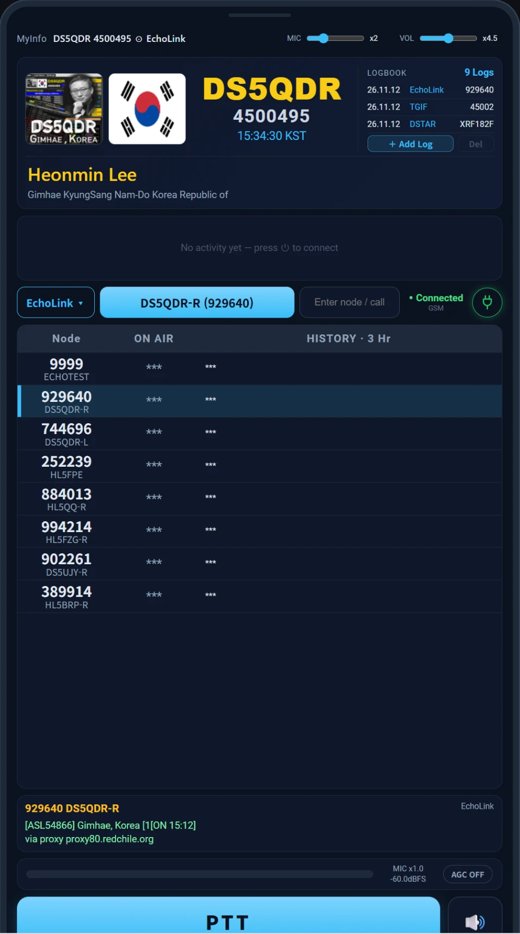
▲ EchoLink 접속 — 아래 상자에 노드 정보EchoLink link — node info in the box below
5.설정 · TG/REFSettings · TG/REF
- LOGIN — 모드별 서버 · 비밀번호 (모든 기기 공통). 표의 Web 칸은 이 브라우저판 전용입니다.LOGIN — per-mode servers and passwords (shared by all devices). The Web column belongs to this browser edition.
- Web 칸 — ESSID(기본 54, 다른 기기와 겹치지 않게) · 모드 메뉴 체크(끈 모드는 Radio 메뉴에서 숨김) · TxLimit · ShowMyInfo.Web column — ESSID (default 54, must differ from other devices), mode menu checks (unchecked modes are hidden in Radio), TxLimit, ShowMyInfo.
- TG LIST — 모드별 TG · 리플렉터 · 노드 목록 (모든 기기 공통). 🔍 Search 로 찾아 넣을 수 있습니다.TG LIST — TG / reflector / node lists per mode (shared). Add entries with 🔍 Search.
- 바꾼 뒤 💾 Save. 웹은 바로 적용되고, 앱은 각 기기에서 ⇅ Sync ▸ 가져오기.Press 💾 Save. The web uses it immediately; apps apply it with ⇅ Sync ▸ Import on each device.
같은 DMR ID 로 같은 ESSID 를 두 기기가 쓰면 서로 끊깁니다. Web 은 54, Windows 55, Phone 56, PoC 57 처럼 다르게 두세요.
Two devices using the same DMR ID and ESSID disconnect each other. Keep them different — e.g. Web 54, Windows 55, Phone 56, PoC 57.
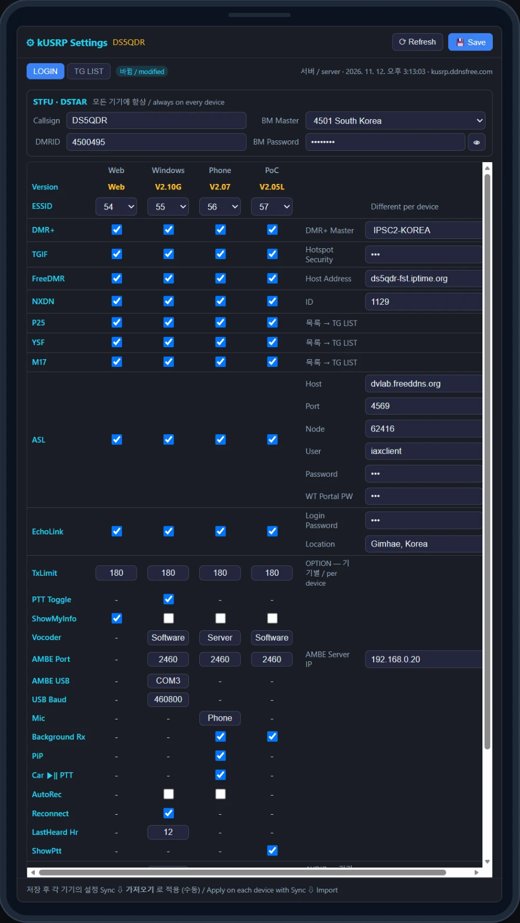
▲ 설정 · TG/REF — 맨 왼쪽이 Web 칸 (ESSID 54)Settings · TG/REF — the Web column on the left (ESSID 54)
6.Logbook · LVMON · 설명서Logbook · LVMON · Manual
- Logbook — 앱과 같은 로그북. 보기 · 고치기 · 지우기 · ADIF · QRZ 올리기.Logbook — the same logbook as the apps: view, edit, delete, ADIF, upload to QRZ.
- LVMON — lvmon.freeddns.org 와 같은 실시간 모니터. 로그인 값으로 자동 로그인합니다. [새 창으로] 로 따로 열 수 있습니다.LVMON — the same live monitor as lvmon.freeddns.org, signed in automatically. [Open in new tab] opens it separately.
- 설명서 — Phone · PoC · Windows · Web 설명서. PDF 로 저장할 수 있습니다.Manual — Phone · PoC · Windows · Web manuals; save as PDF.
7.문제 해결Troubleshooting
| 증상Symptom | 해결Fix |
|---|---|
| 소리가 안 남No audio | 화면을 한 번 누르기 · 🔊 켜기 · VOL 올리기tap the page once · turn 🔊 on · raise VOL |
| 송신이 안 됨Cannot transmit | 브라우저 주소창의 마이크 권한 허용 · 다른 국이 말하는 중인지 확인allow the microphone in the address bar · check nobody else is talking |
| BM 로그인 실패BM login failed | 시작 탭에서 로그아웃 후 현재 BM Hotspot Password 로 다시 로그인sign out on Home and sign in again with your current BM Hotspot Password |
| 자꾸 끊김 (DMR)Keeps dropping (DMR) | 다른 기기와 ESSID 가 겹치는지 설정에서 확인check in Settings that the ESSID is not shared with another device |
| ASL WT 거절ASL WT refused | WT Portal PW 확인 · 그 노드가 WT 를 허용하는지 확인 (WT 를 끄고 내 노드로 접속해 보기)check WT Portal PW · the node may not allow WT (try with WT off via your own node) |
| EchoLink 응답 없음EchoLink no answer | EchoLink 비밀번호 확인 · 같은 콜사인으로 다른 EchoLink 앱이 켜져 있으면 끄기 · 잠시 뒤 다시check the EchoLink password · close other EchoLink apps using the same callsign · try again shortly |